
Flight Attendant Roster Codes: A Guide for Families
What do DO, SBY and LO mean? A family guide to crew schedule codes: days off, standby, flights, layover time zones and what to do when a code is unclear.

The first time you look at a flight attendant’s roster, it can feel like a wall of abbreviations and numbers: DO, SBY, LO, with a few strings of digits in between. These are the codes companies use to plan crew schedules, and they were never meant for the family to read. This guide walks through the most common ones, so partners and parents can tell which days their cabin crew member is at home, which days they’re flying and which days they’re away on a layover.
First things first: every company writes it differently
There’s no worldwide standard for roster codes. A day off might be DO at one company and OFF at another; standby could be SBY or RES, or a letter-and-number code such as S05. The codes below are generic ones that many companies use, but the cabin crew member’s own company guide always has the final word.
Feiban works with most airlines’ rosters: it recognises these common generic codes and flags any day it can’t read, so the cabin crew member can confirm it.
Days off: the days to make plans
DO and OFF mean a day off, and VAC (holiday) and LV (leave) are days off too. RDO is a rostered day off, ADO is an extra day off, and AL or ANL is usually annual leave. On these days your cabin crew member is at home, which makes them the best days for a family dinner, a visit or a day out together.
Standby: no flight on the roster, but on call
SBY means standby, and RES is standby too (some companies call it reserve). Some rosters split it further into HSBY (home standby) and ASBY (airport standby).
There’s no flight scheduled on a standby day, but your cabin crew member has to be ready to report for duty and could be called out to fly at short notice. It’s not the day for a trip away, and any plans you do make may need to be cancelled at the last minute. Some rosters add a time window after the code, such as SBY 06:00-14:00; Feiban shows the window along with the meaning.
Flights and layovers: flight numbers, cities and nights away
On a flight day the roster usually shows a flight number, which is a short string of digits. When the outbound and return flights fall on the same day, two numbers may appear together, sometimes followed by an aircraft type. If you see a string of numbers, it’s almost always a working flight day.
LO or LAY means an overnight layover: after landing, the crew rest at the destination and wait for the return flight. On these days your cabin crew member is away from base, usually in another city or country. Feiban marks them as a layover and shows the city whenever it can find it.
Training, medicals and sick leave: keep the day free
TRN and TRG mean training, CRM is crew resource management training and SEP is safety and emergency procedures training. MED, and on some rosters MC, is a crew medical; in some countries MC can also mean a medical certificate for sick leave, and either way it’s a day to keep free. SL, SICK and SCK are sick leave.
Feiban puts all of these under Rest day, meaning best not to plan anything. On a sick day, a message asking how they’re feeling beats an invitation out.
Layover time zones: what time is it there?
The two questions families ask most are ‘What time is it there?’ and ‘When do you land?’ Feiban turns every flight into a boarding pass. Departure and arrival are shown in local time, and the layover end gets a second line in base time: the time where your cabin crew member is based, such as Taiwan time for crew based in Taiwan. If a flight crosses midnight, the date is shown too, so nobody has to add or subtract hours.
The time difference is worked out for that particular day. In cities with daylight saving time, the gap changes during the year: Los Angeles, for example, is 15 hours behind Taiwan during daylight saving time and 16 hours behind the rest of the year. Feiban uses the time difference for the day of the flight, so you don’t have to keep track.
How Feiban turns codes into calendar colours
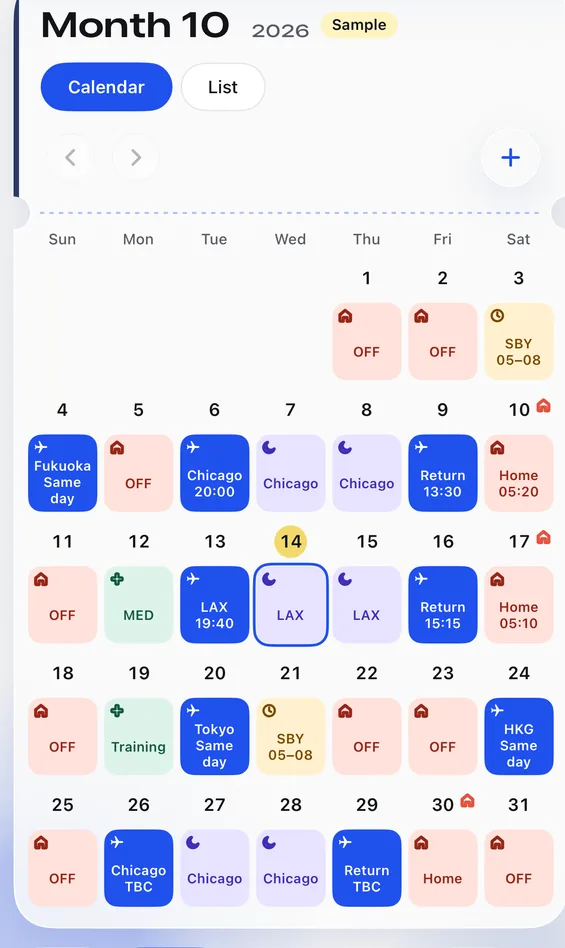
Once the cabin crew member adds a roster to Feiban (by uploading a roster screenshot for AI to read, or by tapping dates and choosing codes; the Privacy Policy explains how screenshots are handled), every code is sorted into one of six categories, each with its own colour and small icon. In the iPhone app’s calendar they look like this:
- Day off: coral, with a little house
- Flight: royal blue, with a plane
- Layover: lavender, with a moon
- Standby: pale yellow, with a clock
- Rest day: mint green, with a cross (training, medicals and sick leave)
- TBC: grey, with a question mark (codes whose meaning hasn’t been confirmed yet)
What if a code doesn’t make sense?
For codes that aren’t listed here, or single letters such as X, P or R that can mean different things at different companies, the most reliable answer comes from the cabin crew member, or from the code guide that comes with the company roster. In Feiban, it works like this:
- Any code Feiban doesn’t recognise, or that could mean more than one thing, is marked as a grey TBC day. Feiban doesn’t guess.
- The cabin crew member confirms what the code means and which category it belongs to, just once. Codes such as
DH(deadhead: flying as a passenger, not working) orGD(ground duty), which don’t show on their own whether it’s a flight day, are also left for the cabin crew member to confirm. - Feiban remembers confirmed codes, so the next time the same code turns up on a roster, it’s translated the way it was confirmed.
If you spot a grey day on the calendar, it simply hasn’t been confirmed yet. The quickest fix is to ask.