
A Family Calendar That Works With a Cabin Crew Roster
A work roster is not a family diary. Check each duty first, then separate days off, standby, layovers and unconfirmed dates so everyone can plan with care.
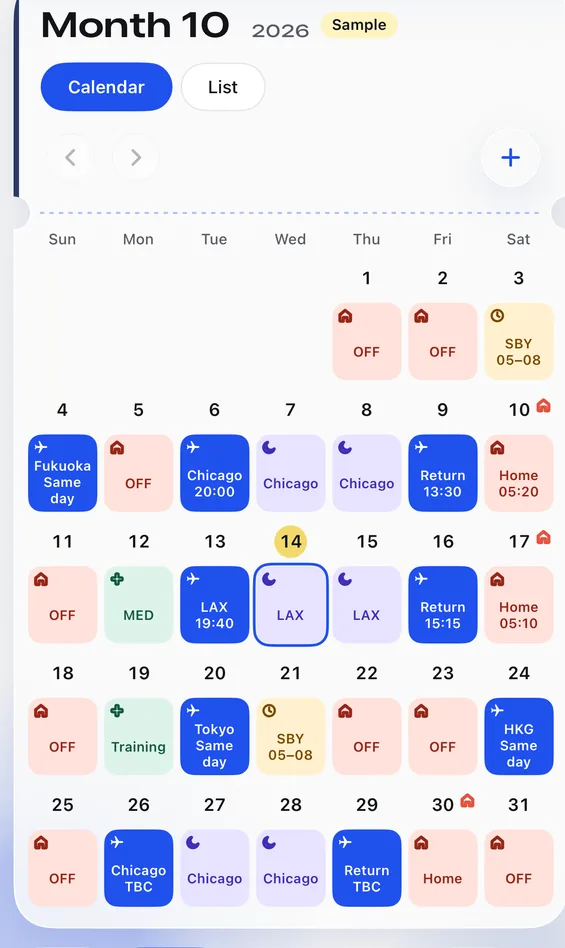
The easiest family-calendar mistake is not forgetting an event. It is reading a blank roster square as ‘free to meet’. Shift work includes standby, flights that cross into another day and nights away from base. A plane icon on a date alone may not tell the family when to make plans.
Start with a simple view of four situations: days off you can discuss, standby days you should not book too firmly, layovers that need a time-zone check, and TBC dates that still need a question.
Step one: let the crew member check the original roster
Check dates, duty codes and flight sectors that cross midnight, especially where one month leads into the next. Reading a screenshot can save typing, but uncertain entries still need comparing with the original roster. If another family member helps organise it, ask the crew member first rather than dropping a work screenshot into a group chat.
- Mark days off and training separately; family members can easily mistake one for the other.
- Give standby its own mark instead of colouring it like a confirmed day off.
- On flight days, check both the departure and arrival dates rather than relying on one calendar square.
- Leave unclear codes as TBC until the crew member has checked them.
Step two: make family plans around confirmed dates
Think of the calendar in two layers: the crew member’s work commitments first, then the family’s agreements. If a duty changes, update the first layer before deciding whether dinner, a lift or caring arrangements need to move. A scheduled landing time is not a promise that someone will be home at that time.
Step three: share only what family needs
Some relatives only need to know which days the crew member is home. Others may help with airport collection. Ask what each person needs, then let the crew member decide who can see which information. Feiban’s family follow code lets selected people join; the crew member can manage the sharing scope, while private notes stay private.
A screenshot is not a calendar that keeps itself up to date. Once sent, an old image can stay on somebody’s phone after the roster changes. For later changes, open the authorised view in the app instead of relying on a saved picture.
Keep a small weekly update habit
- Look at the next seven days once a week. Are there new flight sectors, swapped duties or dates still awaiting confirmation?
- Update only what is confirmed, and mark plans that could move as tentative.
- If a date affects a lift or several people, ask the crew member directly. Do not let a calendar decide for them.
A calendar the family understands means fewer misunderstandings and more time that can actually be planned. Try it for next week before attempting to organise a whole year.
How can family join a roster?Read about follow codes, sharing scope and the boundary around private notes.See Feiban’s calendarFlights, days off, layovers and standby appear in different colours.